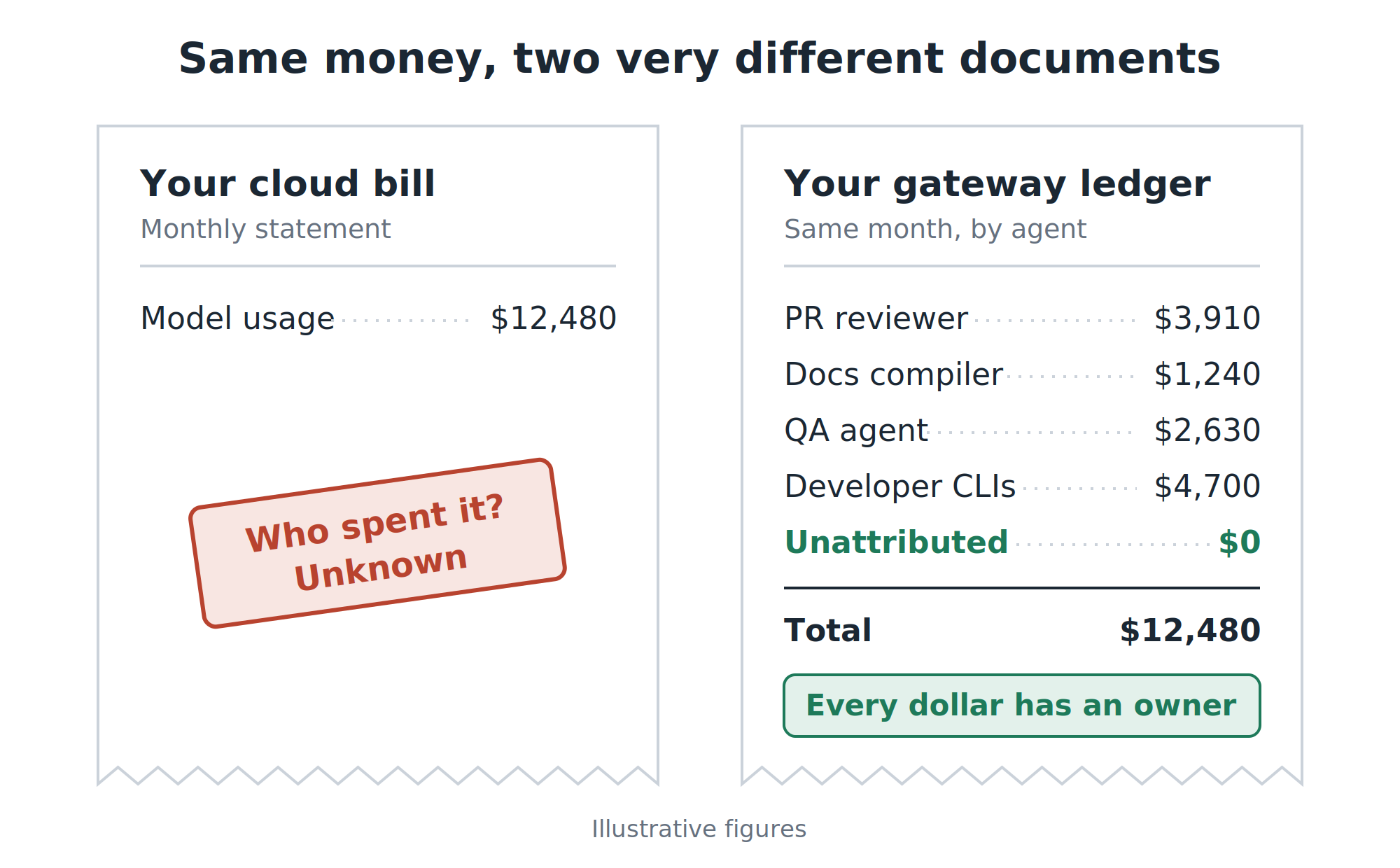
Every month, someone in finance opens the cloud bill and finds a single line for AI. A model name and a number. They ask the obvious question, what did we get for this?, and engineering can’t answer it. Not because nobody cares, but because the bill doesn’t know. Every agent uses the same credentials, so every dollar looks the same.
Picking a cheaper model doesn’t fix that, because you still don’t know where the money went. This isn’t a model problem. It’s an identity problem, and identity is something you can design.
What this post covers:
- Why AI cost control starts with knowing who spent, not with choosing models
- How a gateway (I use LiteLLM) puts one door in front of every AI call, whatever cloud serves it
- Giving every agent its own badge, with its own budget and its own allowed models
- Budgets that warn before they block, and deciding what happens when they do
- Going from a monthly total to cost per unit of work, the number that supports a business decision
- How I run it (Kubernetes + Postgres on AWS, managed mostly from the web UI) and when buying beats building
If you have one agent and one API key, bookmark this for later. If you have five agents and still one API key, keep reading.
The bill that tells you nothing
It always happens the same way. The first agent connects straight to the model provider. The second copies the setup. By the fifth, the pattern is locked in: a PR reviewer, a documentation compiler, a QA agent and a team of developers using AI coding tools, all sharing credentials and all showing up as one line on the bill.
That leaves three questions nobody can answer:
| The question | Why it matters to the business |
|---|---|
| Which agent costs the most? | You can’t prioritize what you can’t rank. |
| What does one piece of work cost? One PR review, one service documented | Without it, “is this worth it?” is an opinion. |
| If an agent runs wild at 2 a.m., what stops it? | Today: nothing, until someone reads the bill. |
All three need the same thing: knowing who made each call and what for, at the moment it happens. That’s what a gateway gives you.
One door for every AI call
A gateway sits between your agents and the model providers. Agents stop talking to clouds. They talk to one door, and the door checks four things on every call:
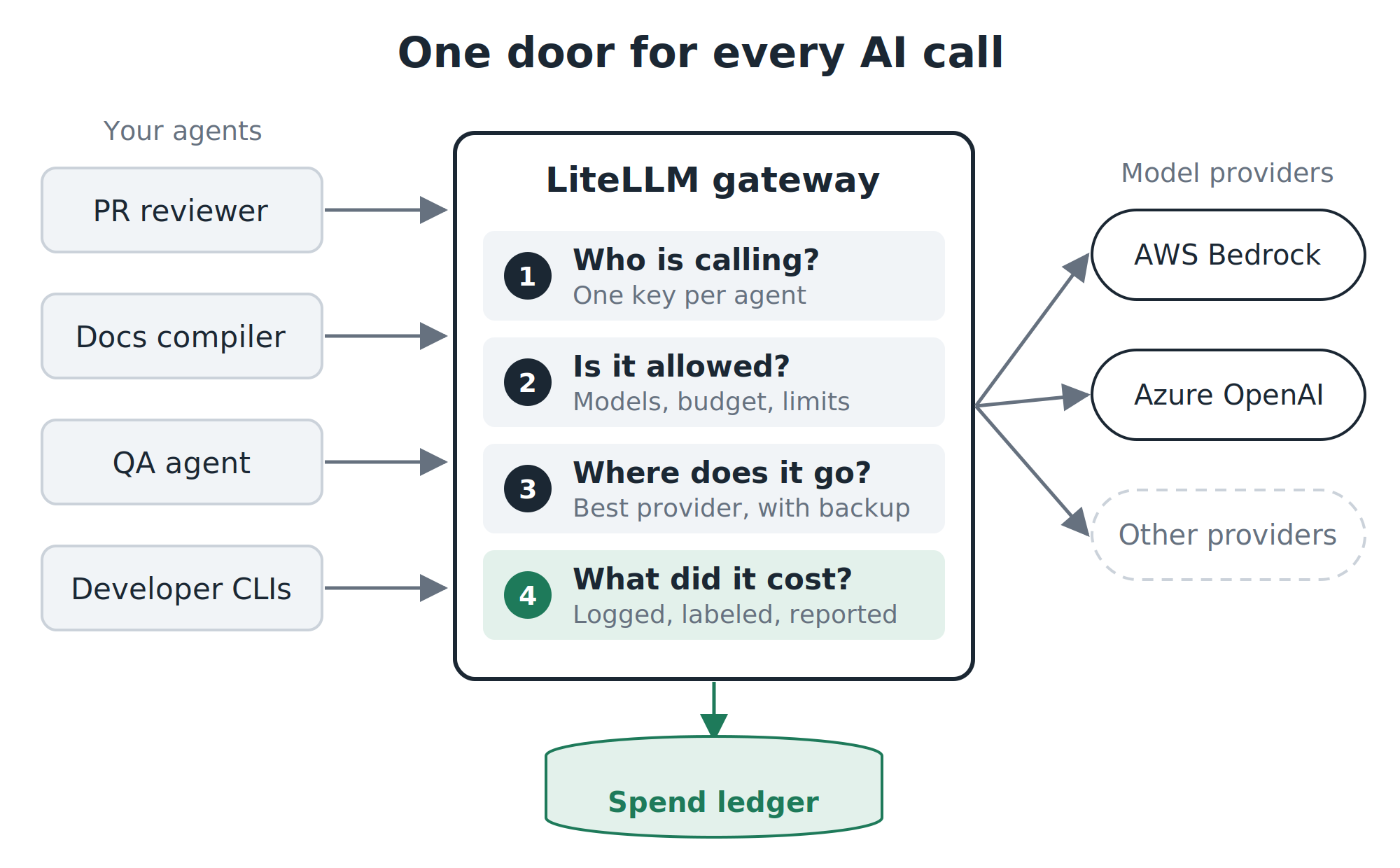
- Who is calling? Each agent has its own key, like an ID badge.
- Is it allowed? Which models this badge can use, how much budget is left, how fast it can go.
- Where does it go? The best provider for the job, with a backup if that one fails.
- What did it cost? Every call is priced, labeled and written to a ledger.
I use LiteLLM, an open-source gateway. It speaks the same API format that agents and coding tools already use, so connecting an agent is usually a matter of changing one URL and one key.
Switch providers without touching a single agent
The first benefit is less obvious than cost, but it’s where cost savings come from later: agents stop knowing which cloud serves them.
Instead of asking for a specific model on a specific cloud, an agent asks for a job, like review-fast. In the gateway, you decide what review-fast means today: Claude Haiku on AWS Bedrock, for example, with GPT on Azure as the backup.
For the business, that means three things:
- Negotiating leverage. When moving to another provider takes a few clicks instead of a project, a better price is something you can actually act on.
- Resilience. If one provider slows down or fails, calls move to the backup. Nobody gets paged.
- Cheap experiments. When I wanted to compare Claude Haiku 4.5 against GPT-5.6 Luna for PR reviews, no agent changed. Same job name, different model behind it, results split by label.
I set this up in LiteLLM’s admin web UI: add a model, give it the job name, attach the provider credentials. No deploy needed.
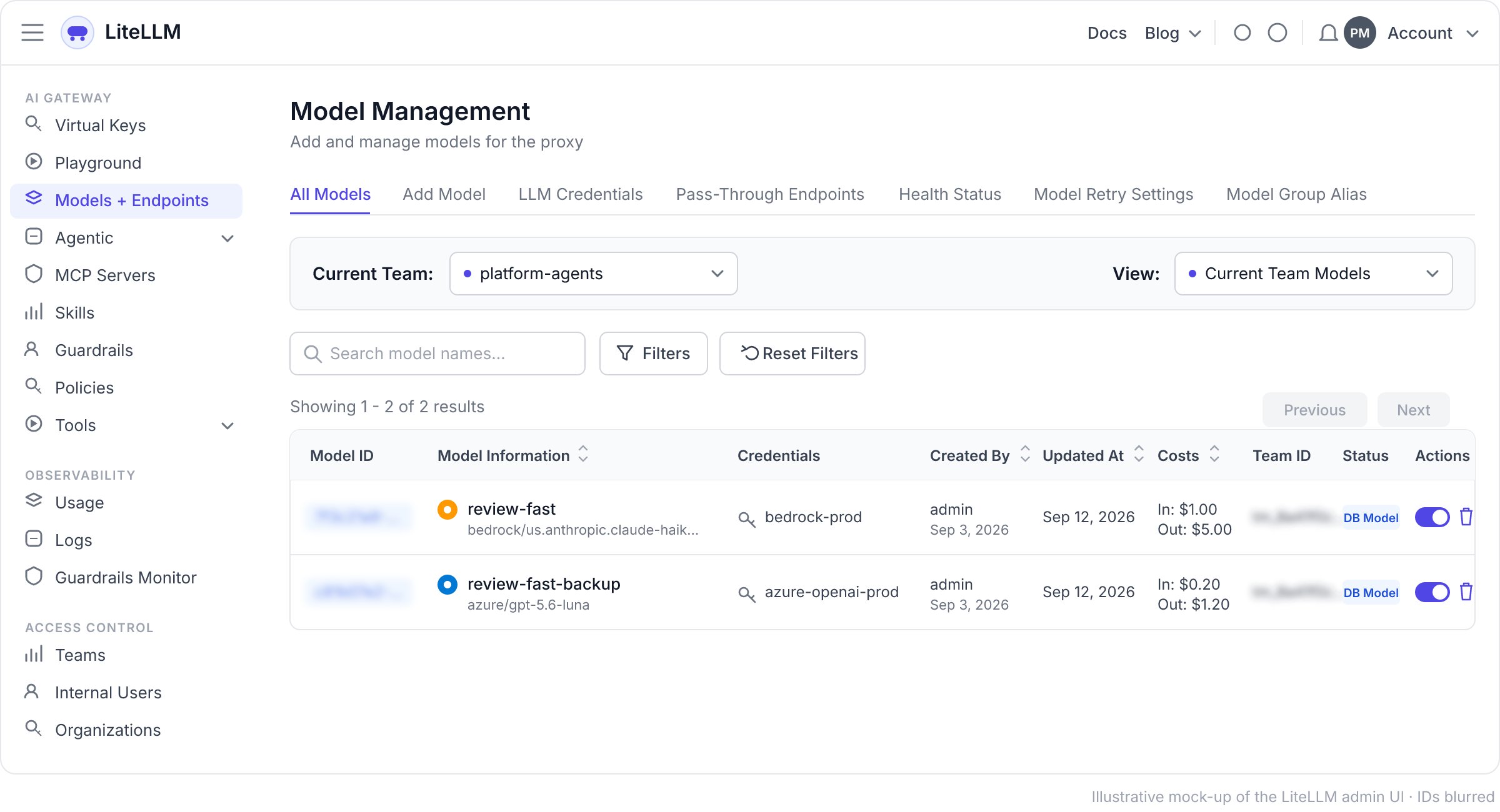
Under the hood, for anyone who prefers configuration as code, the UI is doing the equivalent of this:
model_list:
  - model_name: review-fast                 # what the agent asks for
    litellm_params:
      model: bedrock/us.anthropic.claude-haiku-4-5-20251001-v1:0
      aws_region_name: us-east-1

  - model_name: review-fast-backup          # same job, different cloud
    litellm_params:
      model: azure/gpt-5.6-luna
      api_base: os.environ/AZURE_API_BASE
      api_key: os.environ/AZURE_API_KEY

router_settings:
  fallbacks:
    - review-fast: ["review-fast-backup"]
One detail that protects your credibility: the gateway prices calls using public list prices. If you have negotiated rates or discounts, enter your real prices per model (the UI lets you set a custom cost per token). A cost dashboard that’s 20% off is worse than no dashboard, because people will make decisions with it.
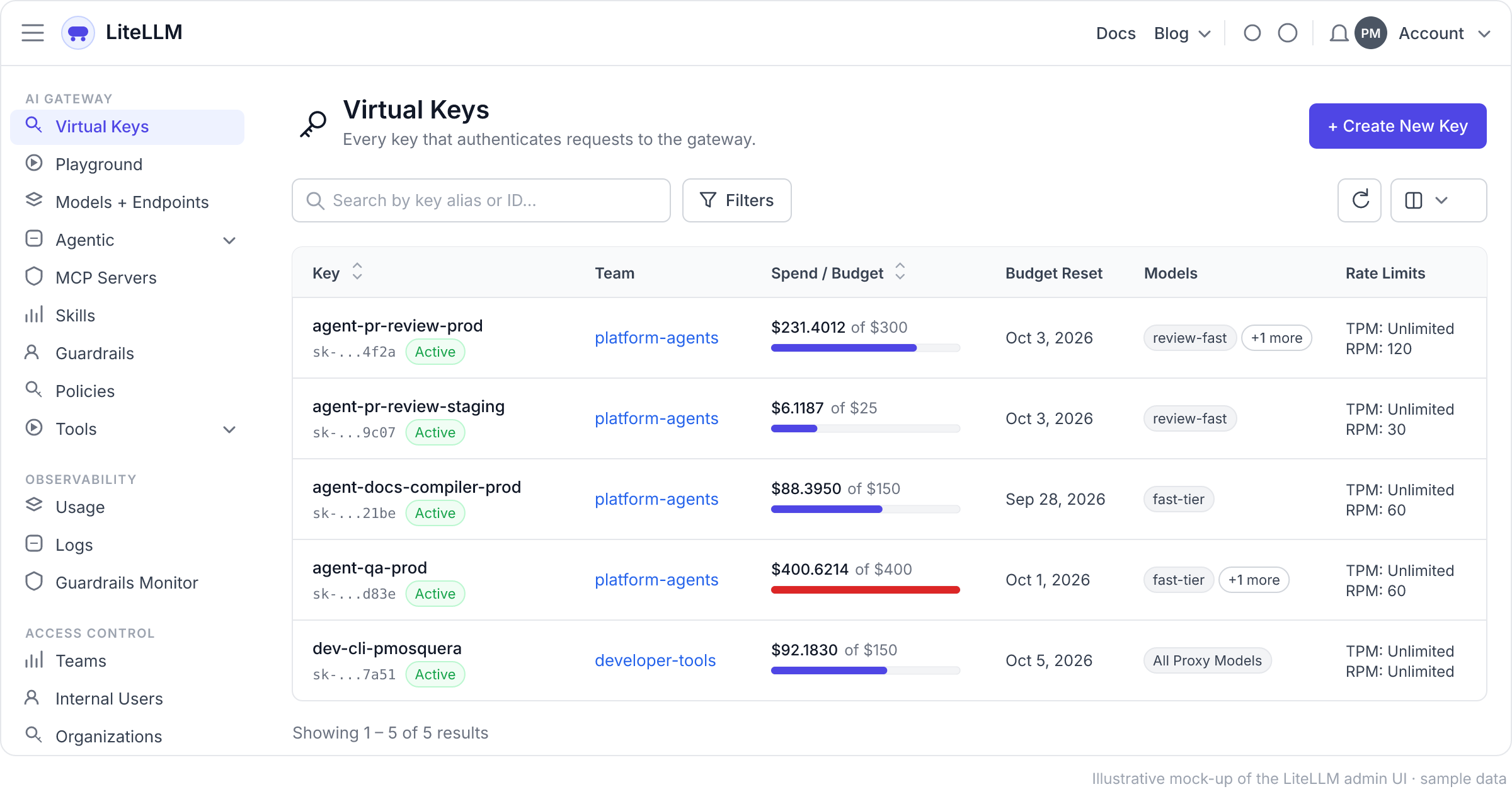
Every agent gets a badge. Every badge gets a budget.
The gateway organizes spend in levels, and each level can carry its own budget:
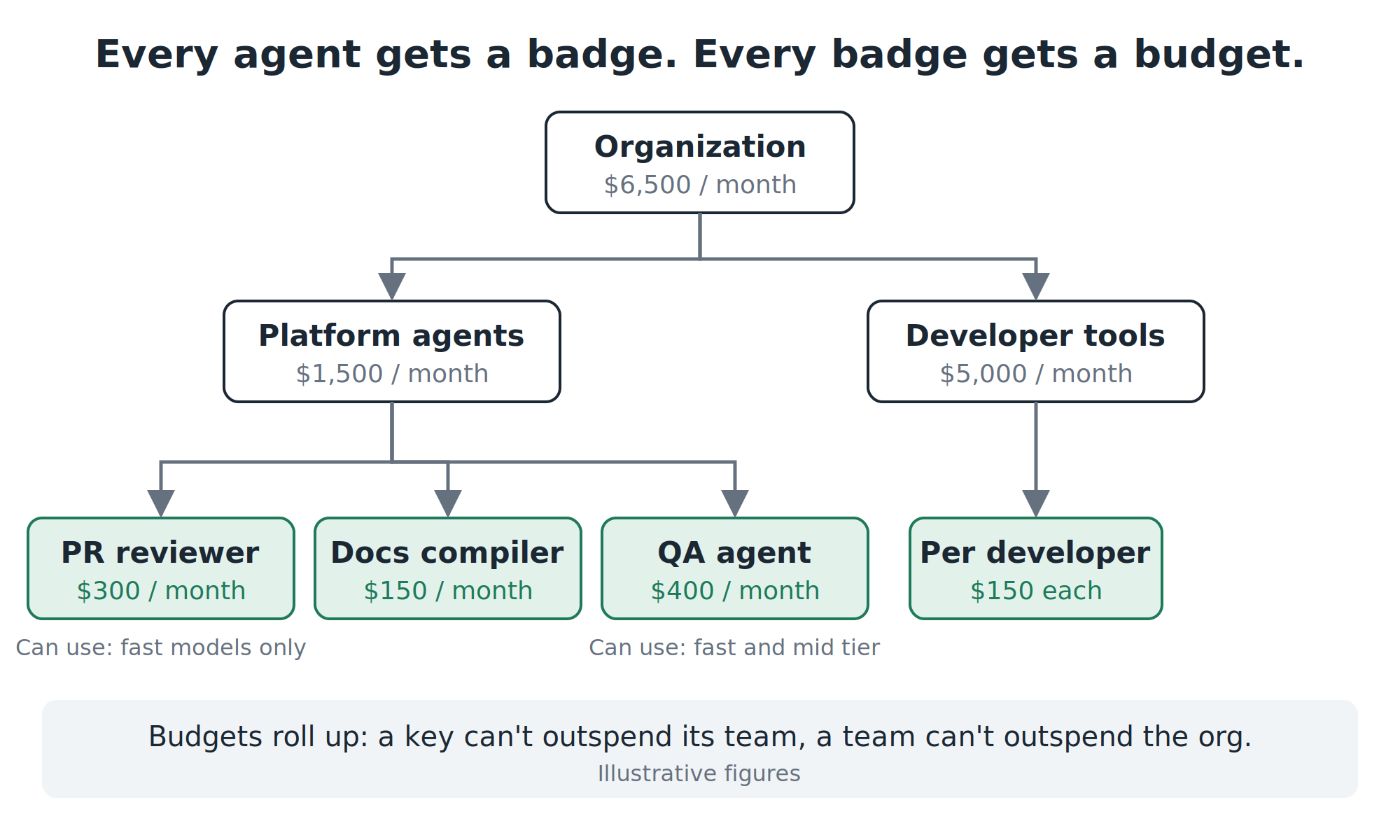
The rule that makes this work is simple: one key per agent, per environment. Not one key per person, and never one key for everything. The PR reviewer in production is a different identity from the PR reviewer in staging, and both are different from the documentation compiler.
For each agent I create a key in the web UI (Virtual Keys → Create key) and fill in a short form: which team owns it, which models it can use, its monthly budget and its speed limits. The alert threshold is the one setting the form doesn’t have; I set it through the API, below.
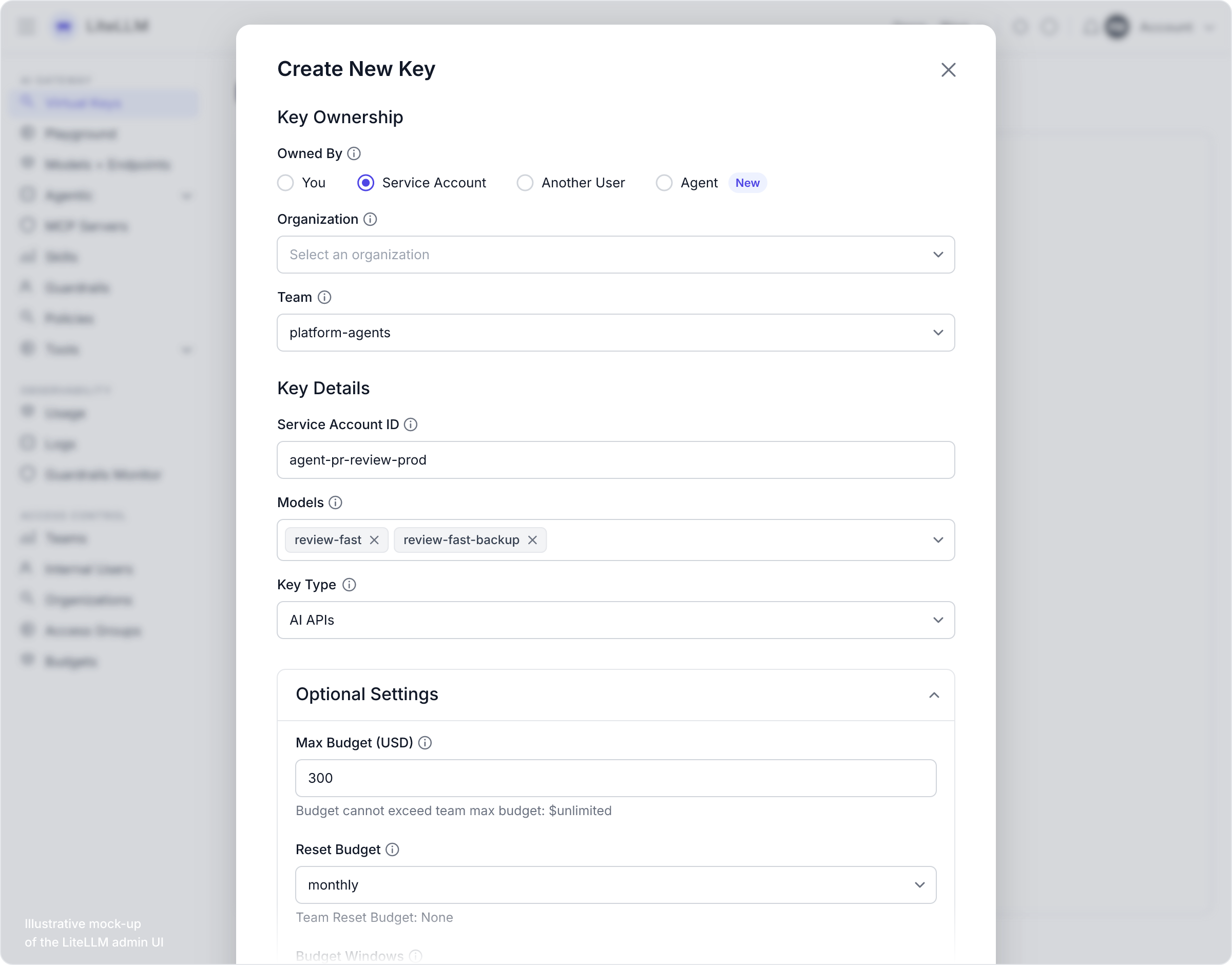
That form is where most of the savings happen, and it’s not the budget field. It’s allowed models. The PR reviewer can’t call the expensive model, even by mistake, even if someone changes its prompt. In my experience, most cost surprises don’t come from a model being expensive. They come from the wrong agent using the expensive model.
This is also why I chose the UI over config files for day-to-day work: budget owners can adjust their own limits without asking engineering for a deploy. Cost control stops being a platform-team bottleneck.
Under the hood, the same key as an API call, useful when you want to automate key creation:
curl -X POST "$LITELLM_URL/key/generate"
  -H "Authorization: Bearer $LITELLM_MASTER_KEY"
  -H "Content-Type: application/json"
  -d '{
    "key_alias": "agent-pr-review-prod",
    "team_id": "platform-agents",
    "models": ["review-fast", "review-fast-backup"],
    "max_budget": 300,
    "budget_duration": "30d",
    "soft_budget": 200,
    "rpm_limit": 120,
    "tags": ["agent:pr-review", "env:prod"]
  }'
A budget that warns before it blocks
Each key gets two lines, not one:
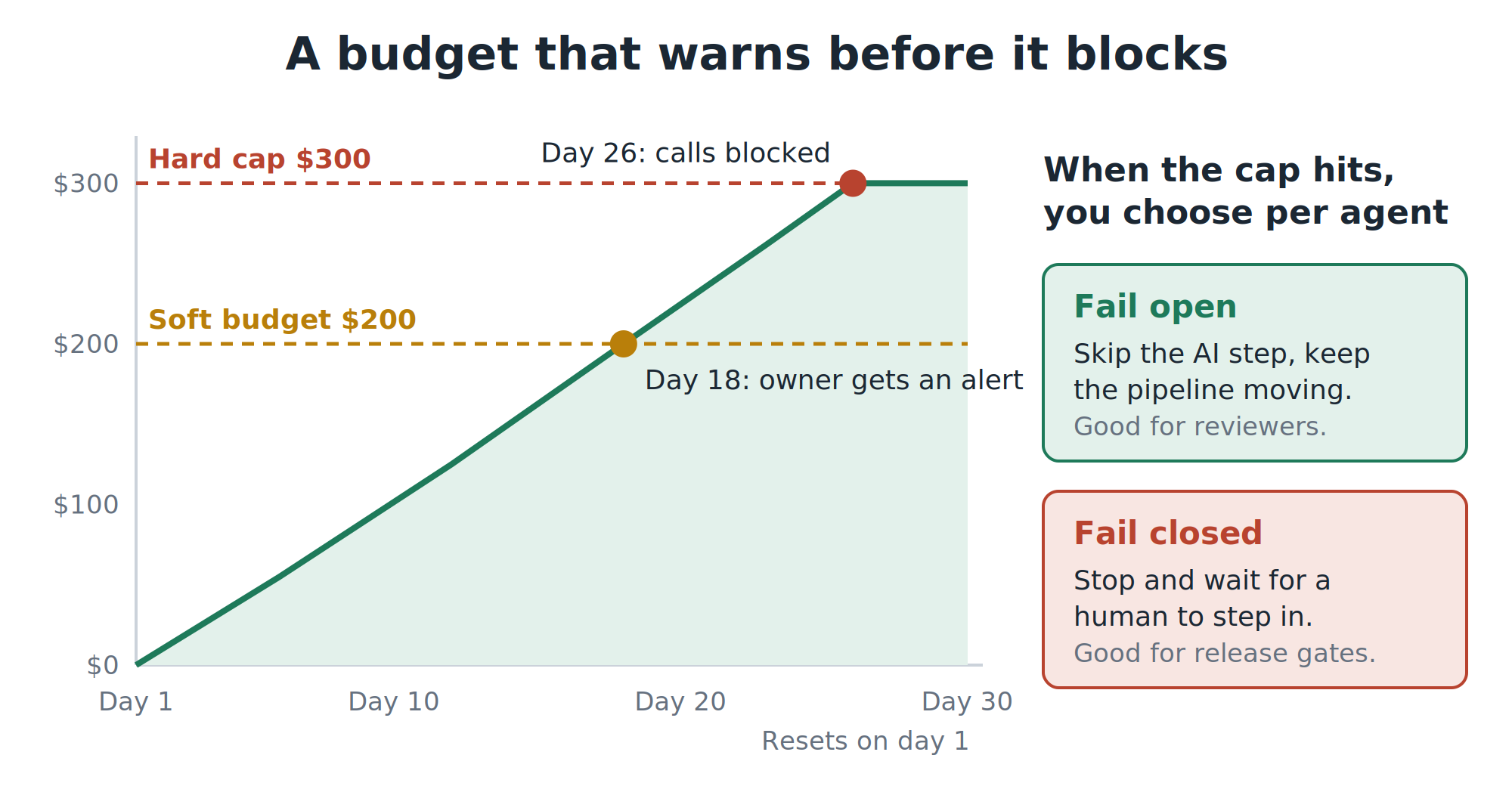
- The soft budget sends an alert to the owner (Slack or email) while there’s still time to act. This is the line people actually see.
- The hard cap blocks calls once it’s reached, and resets at the start of the next period.
- Speed limits (requests and tokens per minute) protect the night, not the month. An agent stuck in a loop at 2 a.m. hits its speed limit in minutes, long before it burns the budget.
Here’s the part almost nobody talks about: what happens when the cap hits is a business decision, not a technical one. If your AI reviewer is a required step and its budget runs out, it can block every release in the company. So decide, for each agent, whether it fails open (skip the AI step and let a human handle it) or fails closed (stop and wait). Then make sure the pipeline does exactly that:
if ! output=$(run_ai_review 2>&1); then
  if grep -q "budget_exceeded" <<< "$output"; then
    post_pr_comment "AI review skipped: monthly budget reached. Human review required."
    exit 0   # fail open: don't block the release
  fi
  exit 1     # any other error is a real failure
fi
Labels that match how the business thinks
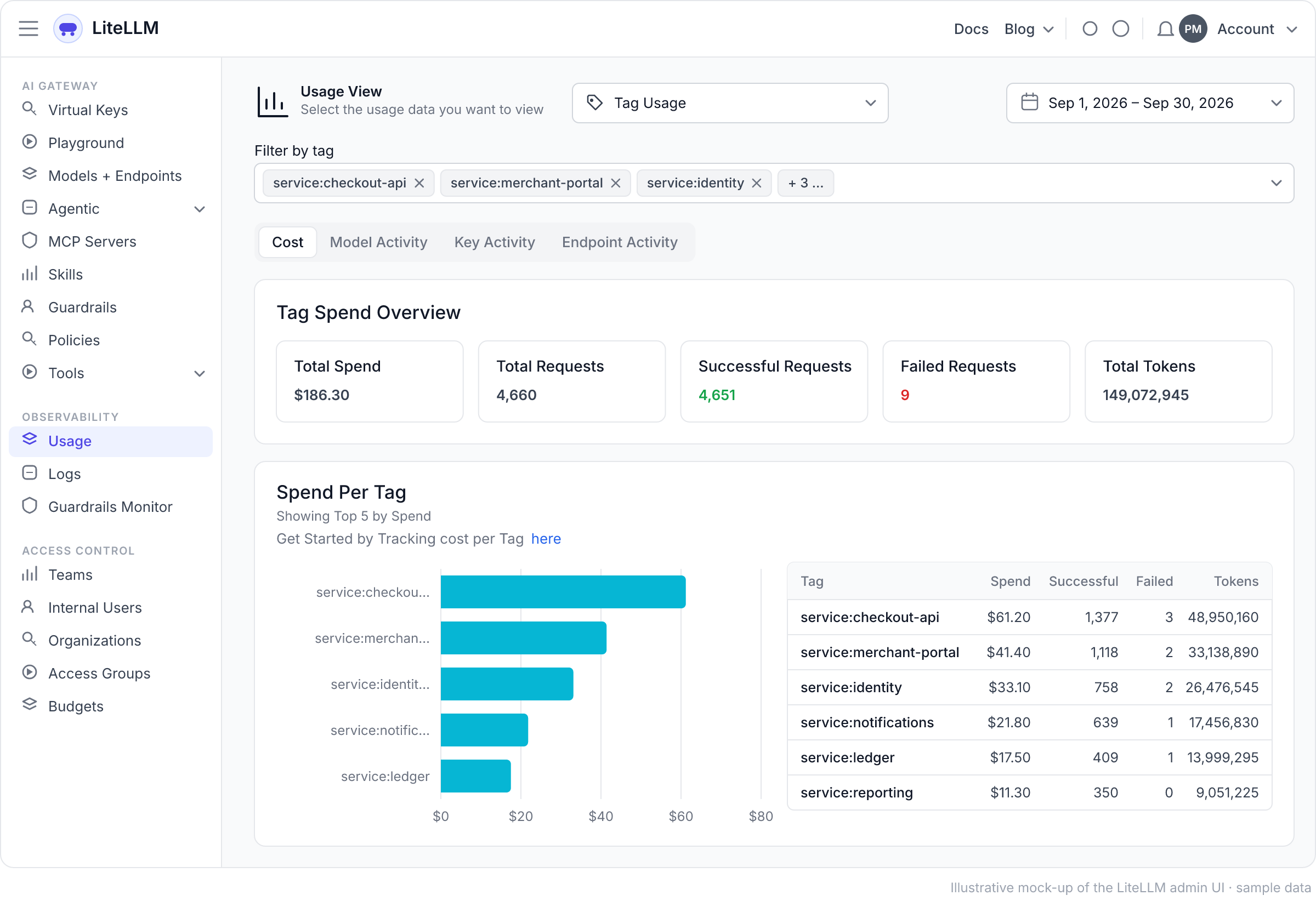
The key tells you who spent. Labels, which LiteLLM calls tags, tell you what for: which product, which service, which kind of task.
Tags can be attached to a key, to a team, or sent with each call. My agents run on Claude Code inside CI pipelines, so sending the labels takes three settings and zero changes to the agent:
export ANTHROPIC_BASE_URL="https://llm-gateway.internal"
export ANTHROPIC_API_KEY="$LITELLM_KEY_PR_REVIEW"
export ANTHROPIC_CUSTOM_HEADERS="x-litellm-tags: repo:${REPO},service:${SERVICE},task:pr-review"
From then on, the Usage view in the web UI slices spend by any of those labels.
Three things worth knowing:
- Keep labels few and stable. Repo, service, task and environment are good labels. A ticket number or build ID is not: it turns your reports into noise.
- You get usage per tool for free. The gateway records which tool made each call (Claude Code, Gemini CLI and others) without any setup.
- Every answer carries its price. The gateway returns the cost of each call, so a pipeline can print “this review cost $0.04” at the end of the job. People change behavior when the number is in front of them.
⚠️ Labels explain spend. Badges control it. LiteLLM also lets you put budgets on labels. Be careful: in May 2026, an issue was reported where label budgets sent with each call weren’t enforced, and spend kept growing. Whether or not your version has the fix, the lesson holds: anything the caller sends is a label, not a lock. Enforce budgets on keys and teams, and use per-call labels only to explain where the money went.
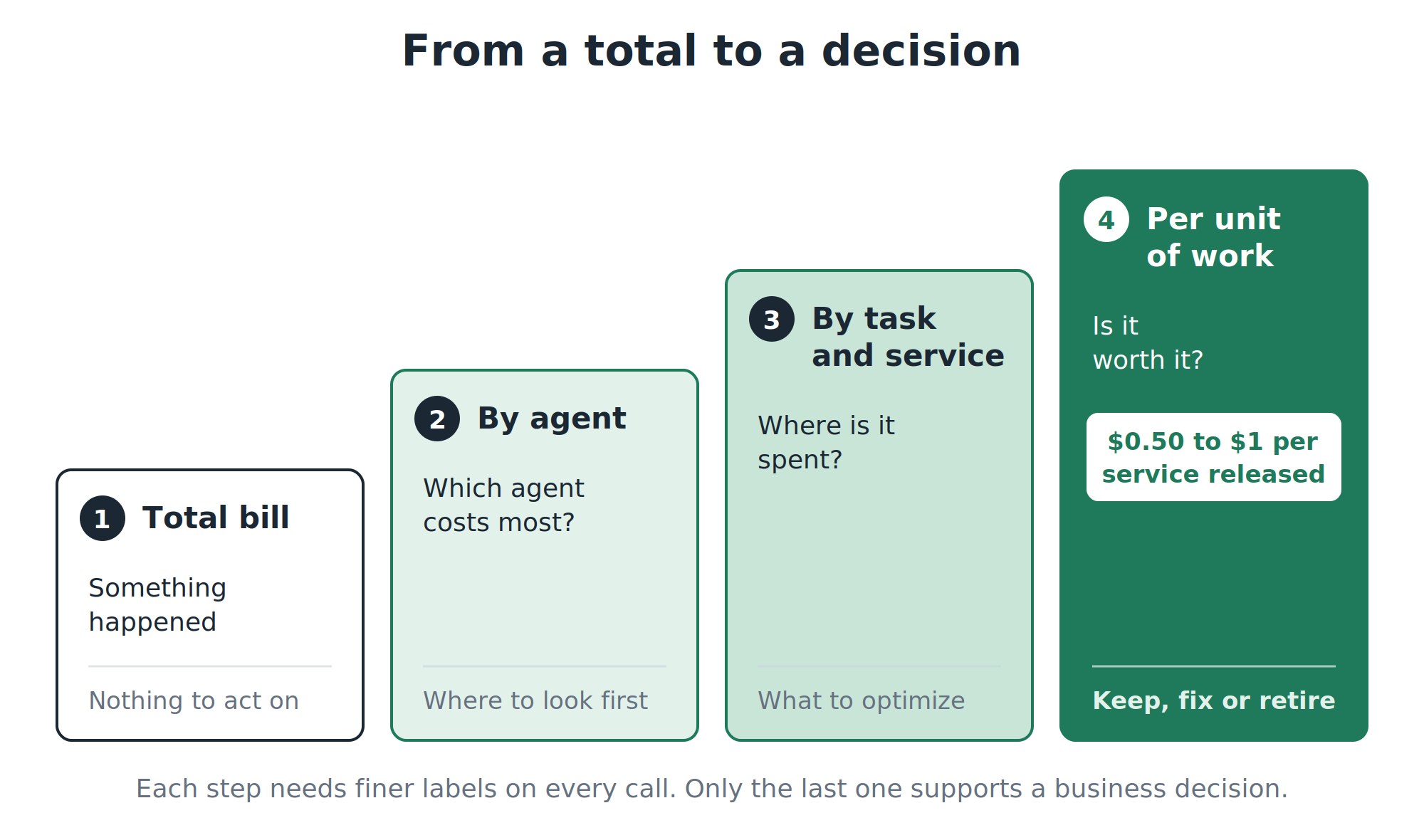
From a total to a decision
A monthly total tells you that something happened. It doesn’t tell you what to do. The number that supports decisions is cost per unit of work, and each step toward it needs finer labels:
What a “unit of work” means depends on the agent:
| Agent | Unit of work | The business question it answers |
|---|---|---|
| PR reviewer | One pull request reviewed | Is AI review cheaper than the bugs it catches? |
| Docs compiler | One service, one release | What does it cost to keep docs true? |
| QA agent | One test plan | How does it compare to the hours it replaces? |
| Developer tools | One engineer per day | Who gets the most out of it, and who’s stuck? |
A real anchor: keeping one microservice’s documentation up to date on every release costs me between $0.50 and $1. That number didn’t exist before the gateway. The bill only knew the monthly total.
Once you have unit costs, the conversations change:
- “Should the AI re-review the whole pull request on every change?” The labels show how many times each PR gets reviewed. If repeats dominate, reviewing only what changed is a bigger saving than any model switch.
- “Is the cheaper model good enough?” Run both behind the same job name and compare. Cost is the easy column. Quality is the one that decides.
- “Is this agent worth it?” Cost per test plan against the hours it replaces is an argument a CFO understands. A monthly total is not.
How I run it
My setup is LiteLLM on Kubernetes (EKS) with Postgres on AWS holding the keys, budgets and spend ledger. Day-to-day configuration happens in the admin web UI.
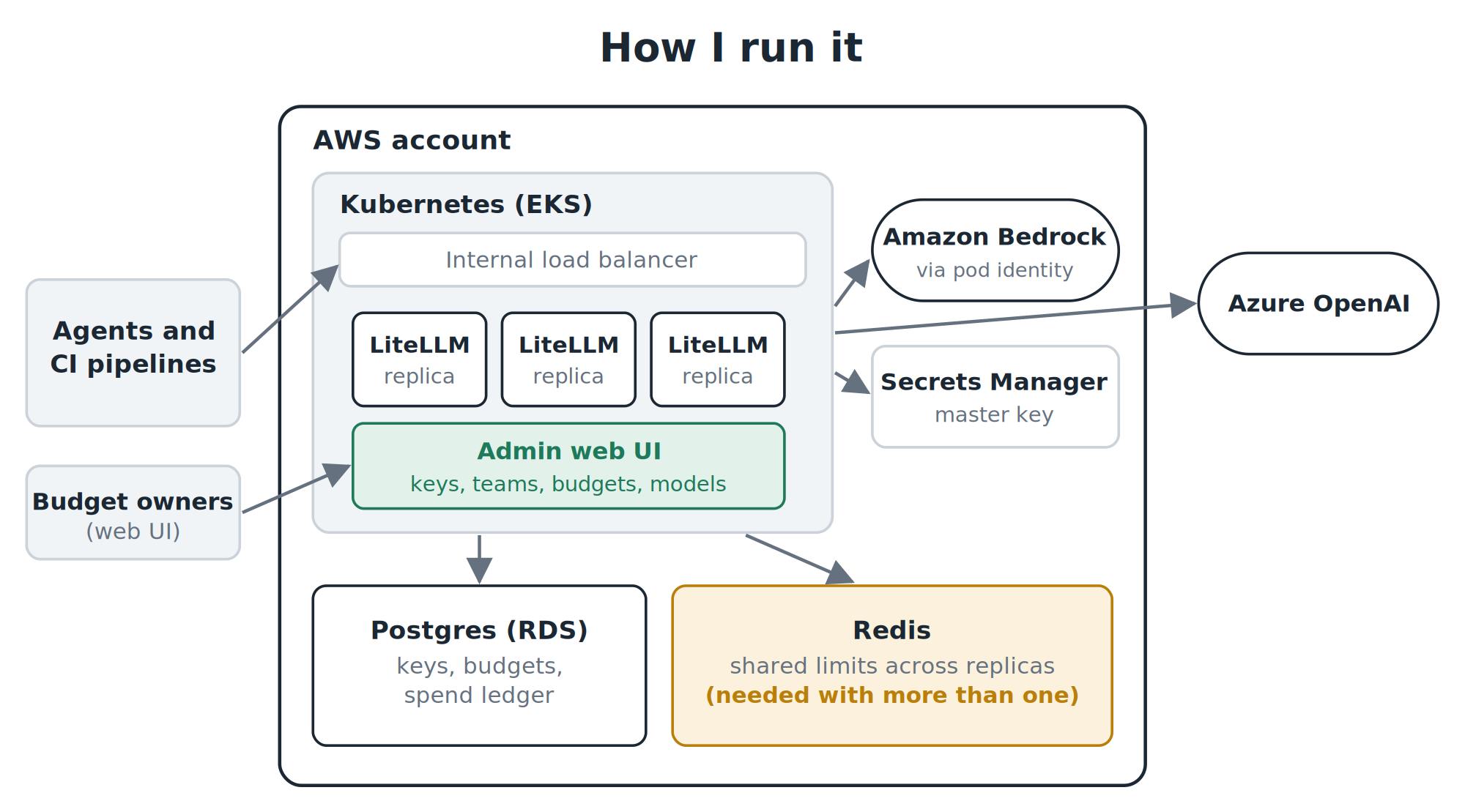
Five lessons, in plain terms:
Guard it like a vault. The gateway holds the credentials for every AI provider you use, which makes it the most valuable target in your AI stack. In March 2026, two LiteLLM releases on PyPI were compromised with credential-stealing code; LiteLLM stated that users of its official Docker image weren’t affected. Use the official image, pin the exact version, and give it cloud access through roles instead of stored passwords.
More than one copy needs Redis. With several copies of the gateway running and no shared memory between them, each copy enforces limits on its own. Three copies means three times the limit you thought you set. Redis gives them a shared count.
The web UI is fast, so protect what it creates. Configuring through the UI means budget owners move without engineering, but the configuration lives in the database, not in Git. Back up Postgres like the financial record it is, and limit who can log in as admin.
Scale on traffic, not CPU. A gateway spends most of its time waiting for the AI provider to answer, so its CPU looks calm while it’s actually at capacity. Scale on requests and tokens per second instead.
No back doors. If an agent can skip the gateway and call the provider directly when the gateway is down, you haven’t built cost control. You’ve built an expensive suggestion. Run at least two copies and make agents fail when the door is closed.
Build it or buy it
Self-hosting isn’t the only option, and it isn’t always the right one:
| You get | You give up | Pick it when | |
|---|---|---|---|
| Self-hosted LiteLLM (open source) | Full control, data stays in your cloud, no fee per call | You run it: uptime, updates, database | You have a platform team and data-residency rules |
| LiteLLM Enterprise | The same gateway plus single sign-on, audit logs and support | A license | You need governance features and a support contract |
| Fully managed gateway (OpenRouter, Cloudflare AI Gateway and others) | Nothing to operate, live in an afternoon | Your traffic passes through a third party, usually for a fee | Small team, no strict data rules |
In a regulated environment, with a team already running Kubernetes, self-hosting was the obvious call. Without a platform team, I’d start with a managed option and revisit when the bill justifies the work.
What it doesn’t solve
- The gateway’s number is an estimate. Compare it with the actual cloud invoice every month. Discounts and cached calls are where the two drift apart.
- It’s one more critical system. Everything in the section above is the price of admission.
- It doesn’t make decisions. It gives you the data. Every budget still needs a named owner who gets the alert and does something about it.
The takeaway
A gateway doesn’t save you money by itself. It tells you, per agent and per unit of work, where the money goes, and it gives you controls that aren’t the off switch.
Everything that actually saves money (the cheaper model, the smaller review, the agent you decide to retire) stops being a guess and becomes a decision you can measure.
Start with one rule: no agent talks to a model without its own badge. The rest follows.